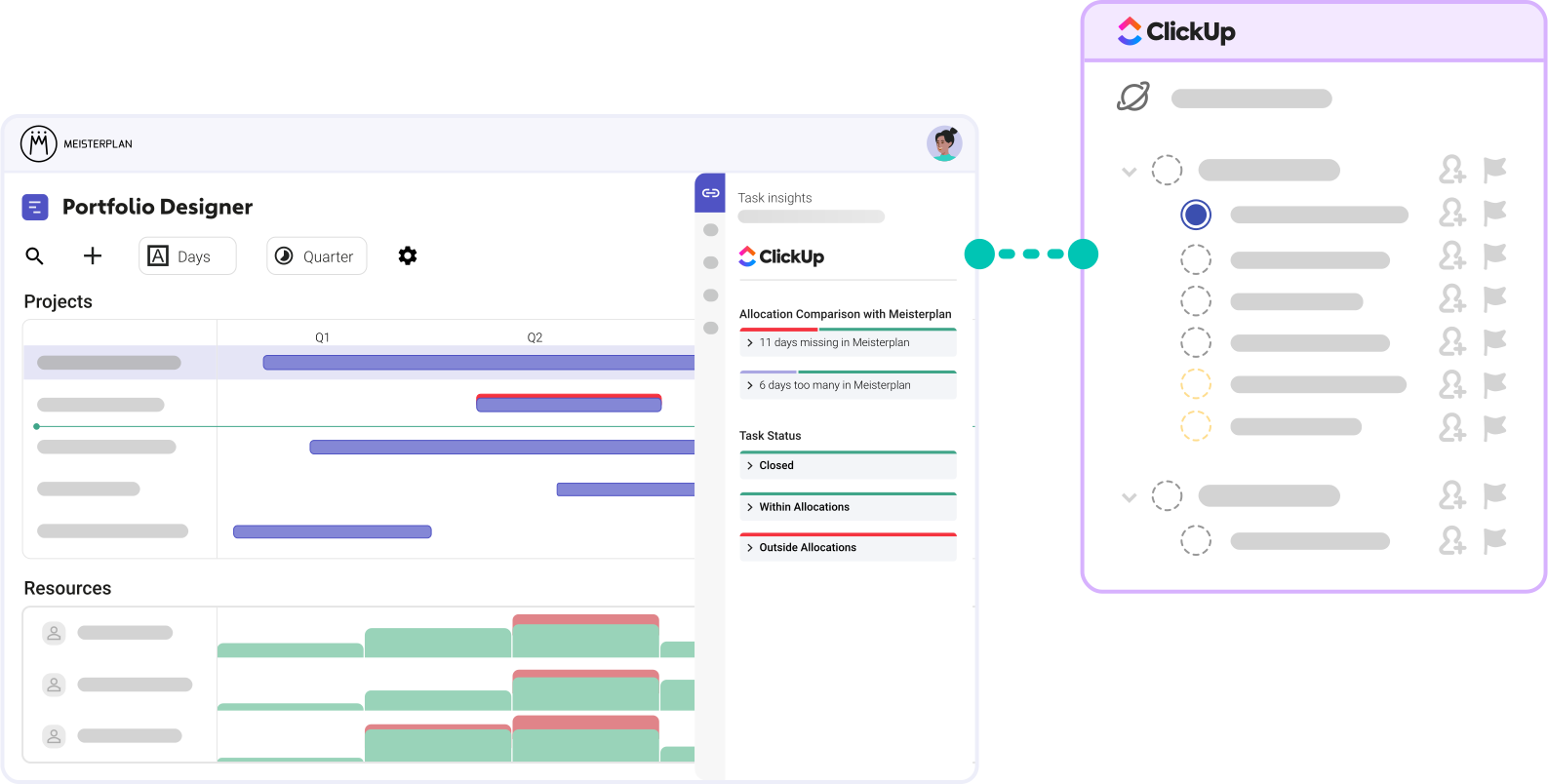
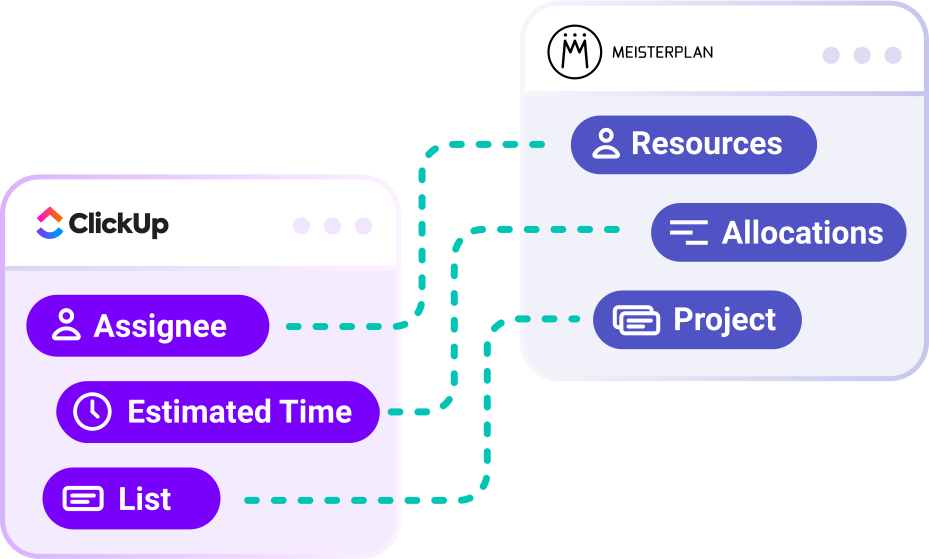
Meisterplan Connects Across All Your Spaces
Automatically translate your task planning from ClickUp to the portfolio level and gain visibility across every list in every space – with zero extra effort for your teams.
- No detailed planning required: Lists with tasks, assignees, and rough timelines are all you need for the portfolio.
- Built for any workflow: Works seamlessly regardless of how many spaces, folders, or configurations you use.
- Comprehensive mapping: We support tasks, subtasks, multiple assignees, dependencies, and more.
How to Test Our ClickUp Integration
No Extra Effort for Your Teams | No Overwriting Data in ClickUp
Step 1:
Start your free trial, click the + icon on the top left of the Portfolio Designer, and select "Import Projects".
Step 2:

Select ClickUp and the specific Workspace and Space you want to connect.
Step 3:

Select the lists inside and outside of folders that you want to see in Meisterplan.
Step 4:
Open the Information Panel for a selected project or go to the "Task Timeline" tab in the Project Details to view your task data in Meisterplan.
Better Together: ClickUp & Meisterplan
Once you’ve completed the initial import of your ClickUp lists and enriched your data in Meisterplan, your workflow should look like this:
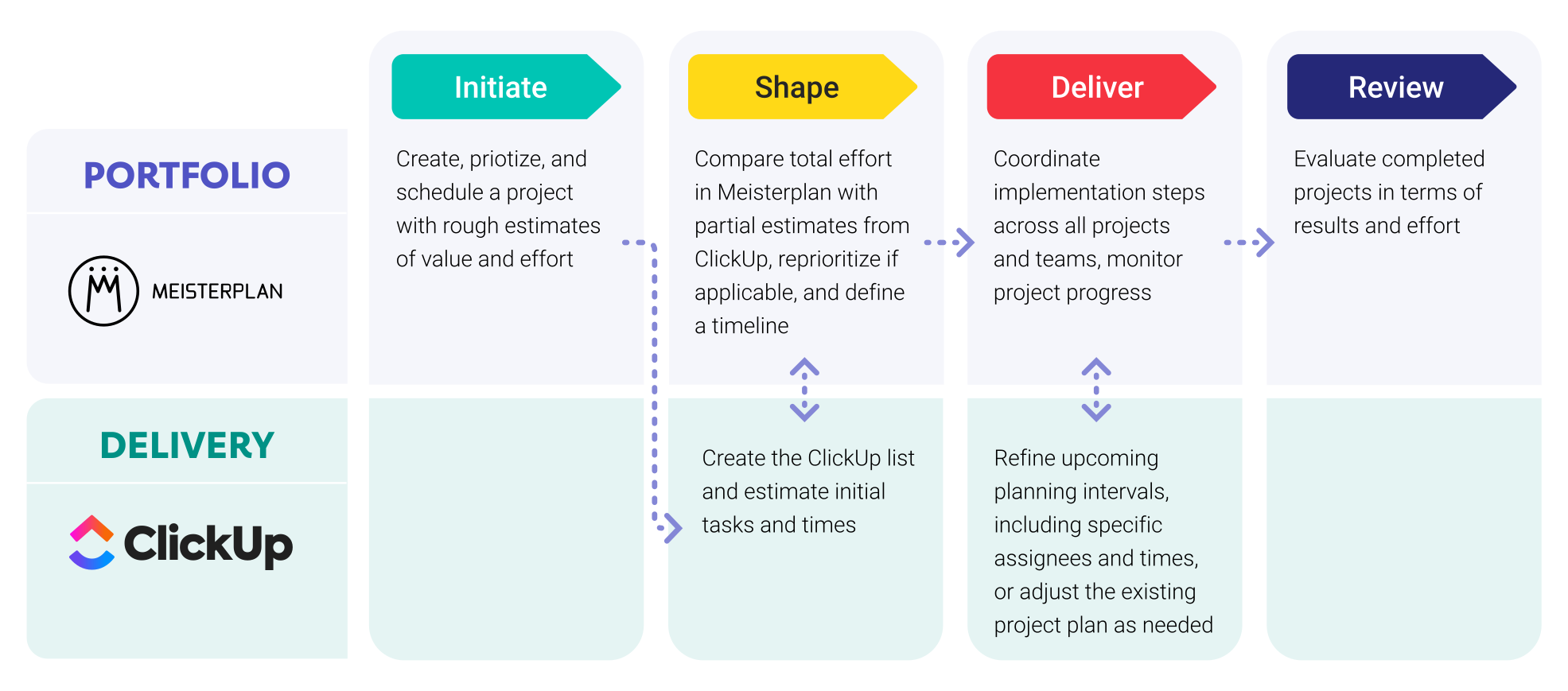
Leveraging ClickUp Data in Meisterplan

Everyone started to see Meisterplan as the endpoint — the place where all data flows and where we make sense of everything. It gives us the executive view, the ability to plan, and the confidence to make decisions.
FAQ
Frequently asked questions about the ClickUp and Meisterplan integration.
Yes, you can create a separate connection to Meisterplan for each Workspace and Space.
Yes, you can easily integrate a system multiple times with different settings. This is especially helpful if different departments have set up ClickUp in various ways.
Almost. The ClickUp API only transmits the total time estimate for a taskTaskSynonym for → ProjectA project is a time-limited undertaking with defined objectives and resources that delivers unique results and often includes complex tasks., not the specific breakdown per assignee. To ensure all resourcesResourceResources are all the people, places and things that you need to complete projects. The most important resource? Employees, of course! are reflected in Meisterplan, Meisterplan distributes allocationsAllocationAllocating describes the strategic process of identifying the correct resources for projects or individual tasks and assigning them accordingly. equally among all resources.
Yes, we import dependencies related to “Blocking” or “Waiting on.” However, pure relationships are not imported.
Yes, though they are mapped on an equal level to tasks rather than being hierarchically subordinated.
No, these are currently ignored during the import.
Unfortunately, no. The ClickUp API does not currently allow this.
Not yet. However, the import of milestonesMilestoneIn project portfolio management, a milestone marks an important point in a project’s progress that requires monitoring or decision-making. Milestones indicate project phases, marking the completion of objectives or the… will be supported soon.
No, Meisterplan does not currently overwrite any data in ClickUp. While we are working on field synchronization, it will only be active if you enable it.
We authenticate you automatically via OAuth2.
The import of milestones is planned but not currently possible.
Meisterplan synchronizes data whenever you work with a linked project. In addition, data is reconciled globally once per night.
No, there is no further effort required on your part after the initial setup.
To use the ClickUp integrationIntegrationAn integration is a virtual interface that connects different software programs and enables automated data exchange between them. This allows for more efficient processes, better planning, and consistent information., you need the Meisterplan Pro or Premium Edition (excluding On-Premise). We also recommend a paid license for ClickUp, as the free plan is heavily restricted in its usage.

Ready for the Next Step?
Connect your existing systems with Meisterplan in no time — and see the results for yourself.